
Open the report
- Open the website in the sidebar.
- Choose AI searches.
- Set the dates and comparison.
The built-in page starts with two widgets and the query list. A separate report created through Add report starts with a title only; add its modules yourself.
What the label means
| Label | Actual meaning |
|---|---|
| AI searches | Google Search Console queries of at least five words |
| Queries | Distinct matching query texts in the selected period |
| Impressions | Appearances for those queries |
This is a word-count grouping. It does not identify ChatGPT referrals, AI-generated answers, AI Overview exposure or conversations with an AI service.
Read the report
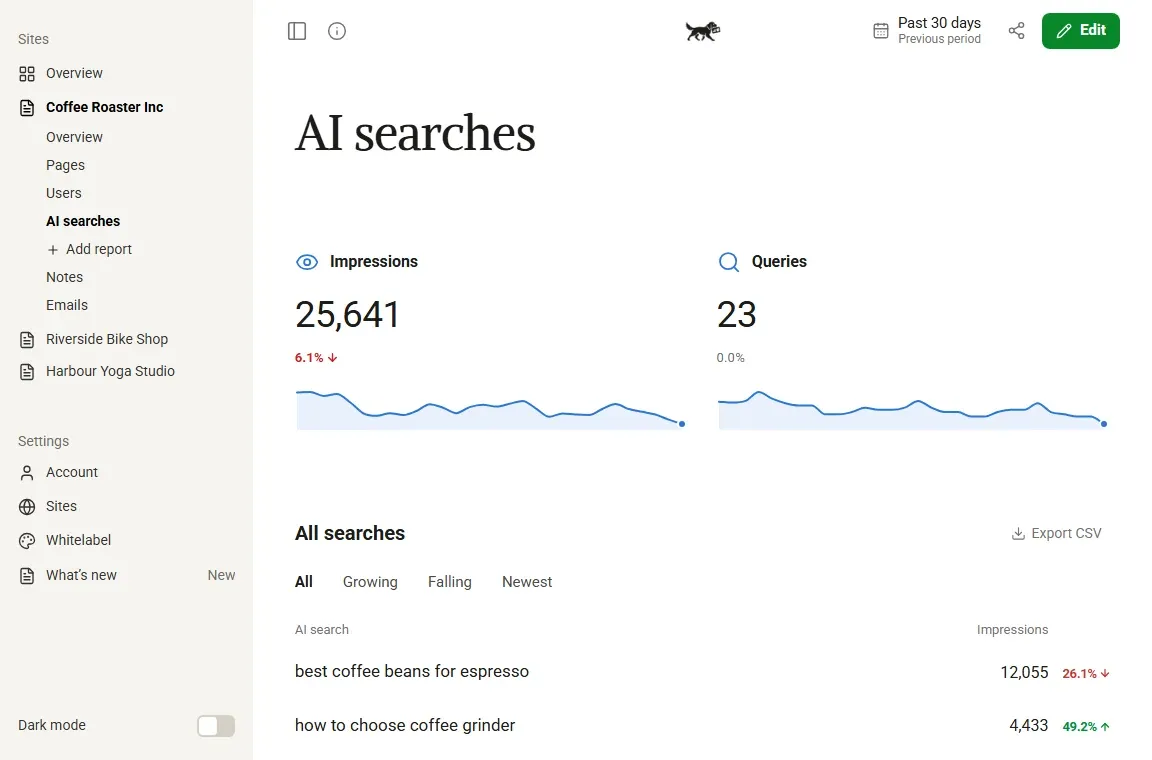
- Read the two widgets for the selected period and their comparison.
- Choose a tab in the query list.
- Press a query or impression count to inspect its history.
- Use the page controls for more rows, or Export CSV to download the current tab’s matching queries.
| Tab | Order and meaning |
|---|---|
| All | Most impressions first |
| Growing | Largest absolute impression gains first |
| Falling | Largest absolute impression losses first |
| Newest | Queries first seen during the selected period, newest first |
Growing and Falling need an available comparison. Newest adds First seen; enough earlier history is required to identify genuinely new queries within stored data. A New badge does not prove a query never existed before that history.
The table shows impressions as numbers, with their change when a comparison is available. The selected tab determines row order. The column headings have no sorting controls. CSV includes matching rows from every page of that tab and adds the previous impressions and first-seen date where applicable. A query seen on multiple days counts once in the Queries widget.
In edit mode, choosing a tab saves the module’s starting tab. A viewer’s temporary choice does not change that saved setting. A report filter can narrow the data. Discover and Google News have no query list.